
Mikrotik 7.20 evpn vxlan
前情提要
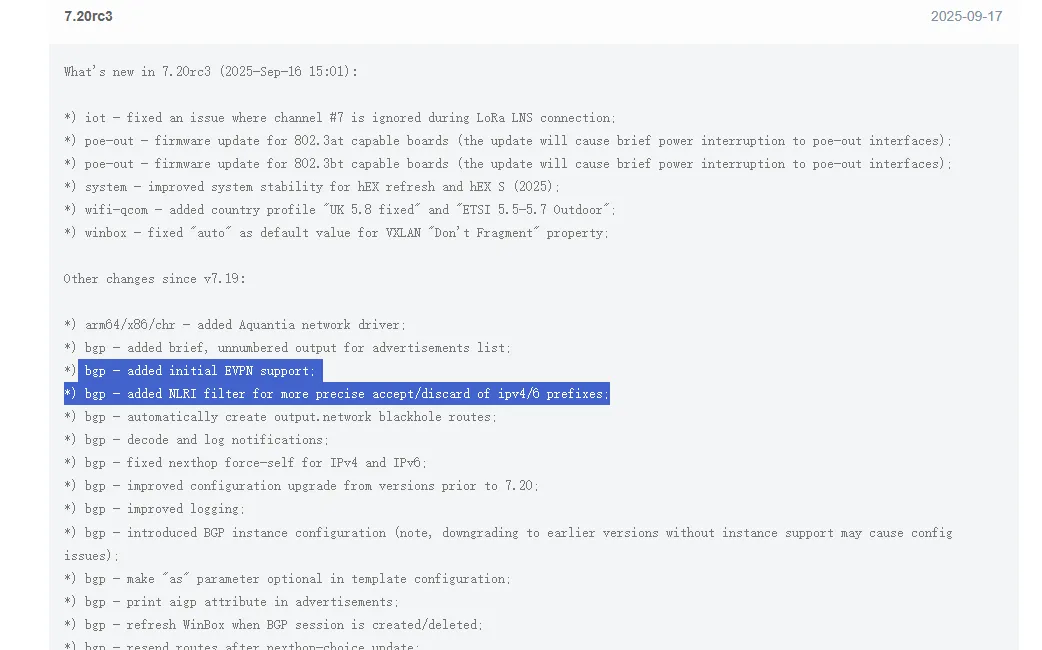
7.20版本刚刚支持EVPN,且图形化界面都没有,只能手敲
EVPN官方文档:https://help.mikrotik.com/docs/spaces/ROS/pages/315883568/EVPN#EVPN-VXLANandEVPNconfiguration
实验拓扑
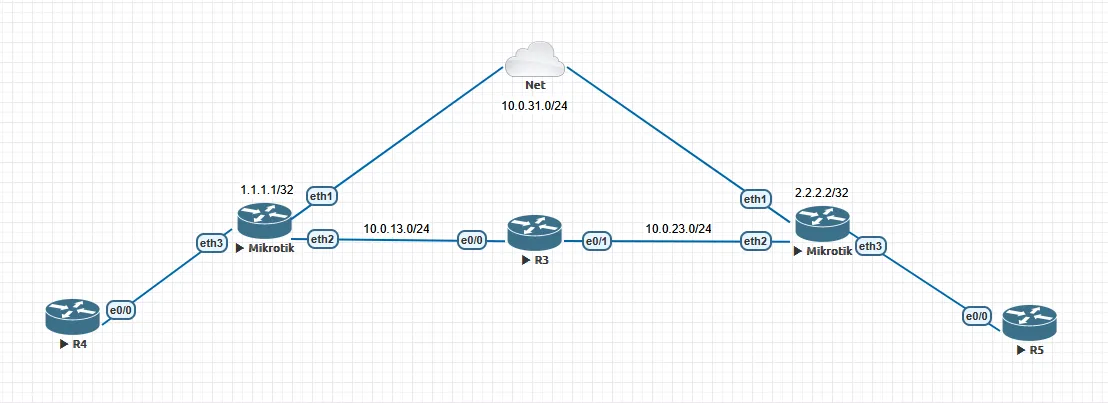
保证两边Mikrotik的环回口通讯,用环回口建立EVPN,跑动态VXLAN
实验
Mikrotik(左)
接口配置:
/interface bridge
add fast-forward=no name=Lo0 protocol-mode=none
/ip address
add address=10.0.31.139/24 interface=ether1 network=10.0.31.0
add address=10.0.13.1/24 interface=ether2 network=10.0.13.0
add address=1.1.1.1 interface=Lo0 network=1.1.1.1

OSPF:
/routing ospf instance
add disabled=no name=ospf-instance-1 router-id=1.1.1.1
/routing ospf area
add disabled=no instance=ospf-instance-1 name=ospf-area-1
/routing ospf interface-template
add area=ospf-area-1 disabled=no interfaces=ether2 type=ptp use-bfd=yes
add area=ospf-area-1 disabled=no interfaces=Lo0

BGP:
/routing bgp instance
add as=63689/63689 disabled=no name=bgp-vxlan
/routing bgp template
add afi=evpn as=0 disabled=no multihop=yes name=vxlan nexthop-choice=force-self
/routing bgp connection
add afi=evpn as=63689 disabled=no input.accept-nlri=input .allow-as=2 instance=bgp-vxlan local.address=1.1.1.1 .role=ibgp multihop=yes name=bgp1 \\
    nexthop-choice=force-self output.network=output .redistribute=connected remote.address=2.2.2.2/32 .as=63689 routing-table=main templates=\\
    vxlan
/routing bgp evpn
add disabled=no export.route-targets=1010:1010 import.route-targets=1010:1010 instance=bgp-vxlan name=bgp-evpn-1 vni=1010

/interface bridge
add fast-forward=no name=bridge-vxlan protocol-mode=none pvid=10 vlan-filtering=yes
/interface bridge port
add bridge=bridge-vxlan interface=ether3 pvid=10
/ip address
add address=192.168.1.254/24 interface=bridge-vxlan network=192.168.1.0

vxlan配置,需要关闭vxlan自学习
/interface vxlan
add bridge=bridge-vxlan bridge-pvid=10 dont-fragment=disabled hw=no learning=no local-address=1.1.1.1 mac-address=00:00:00:00:00:01 name=vxlan1 \\
    vni=1010

/ip route
add dst-address=0.0.0.0/0 gateway=10.0.31.254
add disabled=no distance=111 dst-address=2.2.2.2/32 gateway=10.0.31.140 routing-table=main scope=20 suppress-hw-offload=no target-scope=10
Mikrotik(右)
/interface bridge
add fast-forward=no name=Lo0 protocol-mode=none
/ip address
add address=10.0.31.140/24 interface=ether1 network=10.0.31.0
add address=10.0.23.2/24 interface=ether2 network=10.0.23.0
add address=2.2.2.2 interface=Lo0 network=2.2.2.2

OSPF:
/routing ospf instance
add disabled=no name=ospf-instance-1 router-id=2.2.2.2
/routing ospf area
add disabled=no instance=ospf-instance-1 name=ospf-area-1
/routing ospf interface-template
add area=ospf-area-1 disabled=no interfaces=ether2,Lo0 use-bfd=yes

BGP:
/routing bgp instance
add as=63689/63689 disabled=no name=vxlan
/routing bgp template
add afi=evpn as=0 disabled=no multihop=yes name=vxlan nexthop-choice=force-self
/routing bgp connection
add afi=evpn as=63689 disabled=no input.accept-nlri=input instance=vxlan local.role=ibgp multihop=yes name=bgp1 nexthop-choice=force-self output.network=output \\
    .redistribute=connected remote.address=1.1.1.1/32 .as=63689 routing-table=main templates=vxlan
/routing bgp evpn
add disabled=no export.route-targets=1010:1010 import.route-targets=1010:1010 instance=vxlan name=bgp-evpn-1 vni=1010

/interface bridge
add fast-forward=no name=bridge-vxlan protocol-mode=none pvid=10 vlan-filtering=yes
/interface bridge port
add bridge=bridge-vxlan interface=ether3 pvid=10
/ip address
add address=192.168.1.253/24 interface=bridge-vxlan network=192.168.1.0

/interface vxlan
add bridge=bridge-vxlan bridge-pvid=10 dont-fragment=disabled hw=no learning=no local-address=2.2.2.2 mac-address=00:00:00:00:00:02 name=vxlan1 vni=1010

/ip route
add dst-address=0.0.0.0/0 gateway=10.0.31.254
add disabled=no distance=111 dst-address=1.1.1.1/32 gateway=10.0.31.139 routing-table=main scope=20 suppress-hw-offload=no target-scope=10
状态检查
[admin@MikroTik] > routing/bgp session/print
Flags: E - established
 0 E name="bgp1-1" instance=bgp-vxlan
     remote.address=2.2.2.2 .as=63689 .id=192.168.1.253 .capabilities=mp,rr,gr,as4 .afi=evpn .messages=52 .bytes=1171 .eor=""
     local.role=ibgp .address=1.1.1.1 .as=63689/63689 .id=192.168.1.254 .cluster-id=192.168.1.254 .capabilities=mp,rr,gr,as4 .afi=evpn
     .messages=52 .bytes=1171 .eor=""
     output.procid=21 .network=output
     input.procid=21 .allow-as=2 ibgp
     nexthop-choice=force-self multihop=yes hold-time=3m keepalive-time=1m uptime=49m50s730ms last-started=2025-09-18 09:54:28 prefix-count=2


[admin@MikroTik] > routing/route/print where dst-address~"imet"
Flags: A - ACTIVE; b - BGP, e - EVPN
Columns: DST-ADDRESS, GATEWAY, AFI, DISTANCE, SCOPE, TARGET-SCOPE, IMMEDIATE-GW
   DST-ADDRESS                      GATEWAY  AFI   DISTANCE  SCOPE  TARGET-SCOPE  IMMEDIATE-GW
Ab [192.168.1.253:1]imet:0|2.2.2.2  2.2.2.2  evpn       200     40            30  10.0.13.3%ether2
 e [192.168.1.254:1]imet:0|1.1.1.1  1.1.1.1  evpn       200     40            10

[admin@MikroTik] > routing/ospf/neighbor/print
Flags: V - virtual; D - dynamic
 0  D instance=ospf-instance-1 area=ospf-area-1 address=10.0.13.3 router-id=3.3.3.3 state="Full" state-changes=5 adjacency=39m27s timeout=34s

[admin@MikroTik] > interface/vxlan/vteps/print
Flags: D - DYNAMIC
Columns: INTERFACE, REMOTE-IP
#   INTERFACE  REMOTE-IP
0 D vxlan1     2.2.2.2
抓包记录
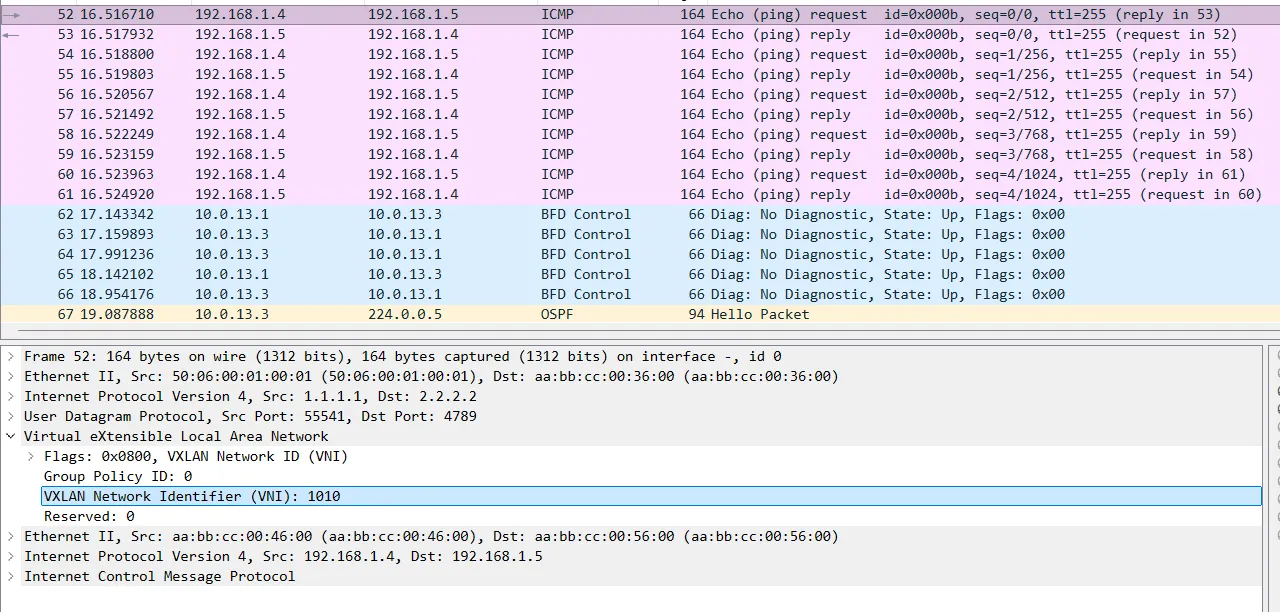
外层源mac为MT物理出接口mac地址,目的mac为直连设备接口mac地址
外层IP包头之后添加UDP目的端口4789(MT可改)
VXLAN VNI 1010
内层二层包头为通信点接口mac
本文链接:
/archives/evpn-vxlan
版权声明:
本站所有文章除特别声明外,均采用 CC BY-NC-SA 4.0 许可协议。转载请注明来自
Wippe's Blog!
喜欢就支持一下吧

